Calls missed by the whole team, not just by one extension
Smart Missed Calls knows the difference — a call routed through a queue that rang at 6 extensions and nobody picked up is ONE missed call, not six. And when someone calls back or the caller returns and a colleague answers, the entry leaves the list on its own. Full audit log included. For ScitPBX, FreePBX, VitalPBX, BlureonPBX and FusionPBX.
Dashboard — live data
Missed-call trends, resolution breakdown, hour of day, day of week, frequently called numbers — see instantly where you lose customers.
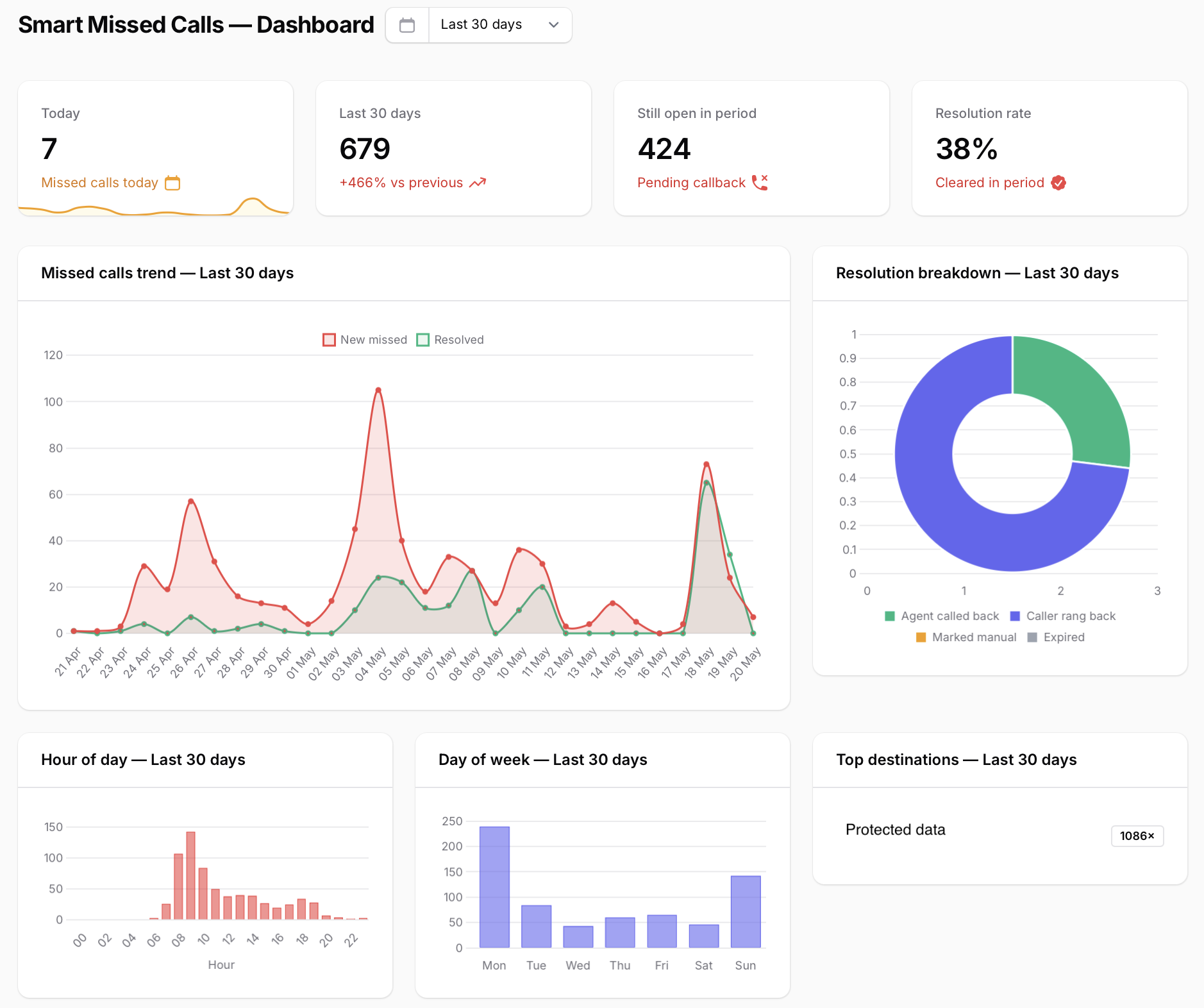
Live capture from our portal — demo data.
Same call, two reports — see how they differ
A caller enters the "Sales" queue. The phone rings at 4 extensions with no answer. A 5th extension picks up and talks for 3 minutes. Here's how the standard report sees it versus Smart Missed Calls.
Same logic applies to ring groups, IVRs, chained transfers. Smart Missed Calls evaluates the WHOLE call before deciding "missed" or not.
The distinction that matters: "missed on one extension" vs "missed by the whole team"
Any FreePBX/VitalPBX CDR report will tell you extension 102 didn't answer. The real question is different: did SOMEONE eventually pick up? Or did the call fall through the queue, IVR and ring group with nobody catching it?
The standard report misleads you
A call into the "Sales" queue rings 5 extensions. The CDR shows 5 "NO ANSWER" rows — looks like a disaster. But a 6th extension picked up. Solved, not lost. Smart Missed Calls applies the right logic: 0 answers across the whole team = lost.
Static lists that age fast
This morning's report has 47 missed calls. During the day colleagues resolve 30 of them — but the list stays frozen in the PDF, the Excel, any static report. SMC is dynamic: when Maria calls Andrew back, his entry leaves the list automatically.
Same callers showing up 5 times
An insistent customer calls 6 times in 10 minutes. The raw report shows 6 entries. SMC aggregates per `(caller, DID)`: ONE entry with `missed_count=6` and the list of extensions that rang. Far more readable, far more actionable.
Nobody knows who did what
With email lists and no audit trail, the manager can't verify whether the call was actually called back or someone falsely marked it "resolved". SMC writes everything: who closed the entry, how (callback, answered later, manual mark, or retention), when, from which extension.
How it works — the actual algorithm
Three steps to start, but the internal mechanism is what makes the difference. We don't grep for "NO ANSWER" in CDR. We verify whether the call was answered BY ANYONE, anywhere in the dialplan.
Install the It4All agent on the PBX
One command on ScitPBX, FreePBX or VitalPBX. Agent runs as systemd, talks to the portal via WebSocket over HTTPS/443. No exposed ports on the PBX.
Algorithm: "did SOMEONE answer?"
For each inbound call, the query aggregates all CDR rows sharing the same `linkedid`. Simultaneous conditions: ZERO rows with `disposition='ANSWERED' AND lastapp='Dial' AND dst=internal extension` (= no human spoke) AND at least one `NO ANSWER` row or `lastapp='missed_calls'` (= evidence of a miss). Only then is it a real miss.
Aggregation + auto-clear
Detection is keyed on `(client, caller, DID)`. The same insistent caller increments `missed_count` instead of duplicating entries. When the agent detects an outbound answered to that number OR a new inbound answered from it — the entry transitions to `cleared` automatically, no human input.
The list cleans itself — no click, no checkbox, no export
Three automatic paths from "open" to "cleared". Each is detected from CDR on the next keepalive cycle (5 min) and recorded in the audit log with the exact reason.
An agent calls back
Andrew on ext. 102 dials the caller. The agent detects the outbound answered call and marks the entry `cleared_by=returned`, recording extension 102 in the audit.
The caller comes back
The caller dials again 30 min later, this time Maria on ext. 105 picks up. Entry auto-closes with `cleared_by=answered_later`.
Manager marks manually
For cases handled offline (whatsapp, email, in-person visit), a permitted user ticks "Resolved". The audit logs user-id, time, and their note.
Plus: automatic retention after N days (`cleared_by=expired`, optional per client) and automatic `reopened` if the caller comes back after a close. All with full audit.
What SMC does differently from any CDR report
Five mechanisms the native report of your PBX — ScitPBX, FreePBX or VitalPBX — doesn't have. All of them keep the list short, accurate, and actionable.
"Team" vs "extension" detection
A queue call ringing 5 extensions where the 6th picks up is NOT missed. A direct call to ext 102 with no answer IS missed. The distinction comes from `linkedid` aggregation in CDR — all events of one logical call grouped, not one row per ring.
The list cleans itself
Three automatic close paths: (1) an agent calls the number from an internal extension → `cleared_by=returned`. (2) The caller comes back and someone answers → `cleared_by=answered_later`. (3) Manager marks resolved manually from the dashboard → `cleared_by=manual`. Plus auto-retention after N days.
Per-entry audit log
Every entry has a complete journal: created, incremented, notified, cleared (with reason), reopened. With actor (agent / specific user-id / cron) and timestamp. The manager can verify whether "manually resolved" was legitimate or forced.
5 notification cadences + dedupe
Off / realtime / hourly / daily / weekly / monthly — per-client, configurable in the portal. Realtime has dedupe per `(caller, DID)` (default 5 min) and a hard rate-limit of 50 emails/hour so the inbox doesn't drown when one caller insists.
Full call context
For each entry you see: caller number + name (from CRM/directory), the DID it came in on, the route label (queue/IVR/ring group), ALL extensions that rang (the list), how many attempts, first and last attempt. The rest you decide with context.
Only metadata leaves the PBX
Recordings, transcripts, conversation content — NEVER leave your PBX. The portal receives only: caller ID, DID, time, duration, called extensions, status. That's it. Enterprise customers get self-hosted: not even metadata leaves their infrastructure.
Calculator — how many of your calls are actually lost?
Set your real numbers. We use a realistic loss rate (3-8% for a well-staffed team, 10-15% for a peak-hour call center). See how much revenue you can recover with consistent callbacks.
Indicative estimate. Actual numbers depend on your domain (B2B SaaS, retail phone sales, technical support — all have different profiles). Use your own data.
Supported PBXs
We work with most IP PBX systems. Detection reads the PBX's native CDR directly — no dialplan changes, no plugins installed on the PBX. Coverage validated on ScitPBX, FreePBX, VitalPBX, BlureonPBX and FusionPBX; other systems are in development or available on request.
FreePBX (self-hosted)
FreePBX 14, 15, 16, 17. Detection based on asteriskcdrdb with the missed_calls marker. Supports queues, ring groups, IVR. Public availability in 2026.
VitalPBX (multi-tenant)
VitalPBX 4.x with full per-tenant support. Each tenant has its own dashboard, separate digest, configurable retention. Public availability in 2026.
Other systems
FusionPBX, Issabel and other IP PBX distributions — on the roadmap. For any other SIP PBX we can scope a custom integration on request.
Privacy by design
Call data is sacred. Smart Missed Calls is designed so call content (recordings, transcripts, conversations) NEVER leaves your PBX.
✓ Metadata only
We send to the portal: caller ID, DID, route label, list of called extensions, time and duration. That's it. No conversation, no voice, no message body.
✓ TLS over port 443
The agent speaks to the portal via WebSocket over HTTPS on port 443. No ports opened on your PBX — works through any corporate firewall, no port forwarding, no VPN.
✓ Immutable audit log
The `smart_missed_calls_audit` table is append-only. Every event (created, incremented, notified, closed, reopened) is logged with actor and timestamp. Nobody can "erase history".
✓ Controlled retention
Configure how many days `open` entries persist (then auto-closed with `cleared_by=expired` and an audit entry). Set per client. No retention = "forever" mode — entries stay open until truly closed.
✓ Self-hostable + GDPR
Enterprise customers can self-host the entire portal in their VPC — even metadata stays in their infrastructure. DPA on request, subprocessors published, right-to-be-forgotten implemented per caller.
Simple pricing, no surprises
Pay once a month, per connected PBX. 30-day Pro trial, no card required.
Free
For small PBXs or testing.
- 1 PBX connected
- Live dashboard
- Daily email digest (1 recipient)
- 7-day retention
- Community support
Pro
For companies with real call volumes.
- 1 PBX (or 1 VitalPBX tenant)
- All digest cadences (hourly / daily / weekly / monthly)
- Unlimited digest recipients
- 90-day retention
- Webhook & CRM integration (Odoo, HubSpot, Salesforce)
Enterprise
For call centers and multi-PBX groups.
- Unlimited PBXs
- VitalPBX multi-tenant with strict isolation
- Configurable retention (up to 7 years)
- Optional self-hosted portal
- 99.9% SLA & 24/7 dedicated support
Frequently asked questions
Detailed answers to the most important questions about Smart Missed Calls.
What's the real difference between Smart Missed Calls and the native "missed calls" report in FreePBX/VitalPBX?
How does the list "clean itself"? What do I actually have to do?
What does it mean that you "don't interfere with native FreePBX/VitalPBX"?
How often does the list update? With what latency do I see a new missed call?
How is the callback made? Is there a "call" button in the dashboard?
How does aggregation work — does an insistent caller appear once or N times?
Does it work with my CRM?
Can I verify whether the team closes entries honestly or marks them "resolved" abusively?
Which phone systems and versions are supported? And what data leaves the PBX?
How do I activate the module on my PBX?
Want Smart Missed Calls on your PBX?
The module runs on ScitPBX, FreePBX and VitalPBX. Tell us about your setup and we'll switch it on — no missed call goes unseen.
☎️ Running a different PBX?
It runs today on ScitPBX, FreePBX and VitalPBX, with FusionPBX on the roadmap. If you run something else, tell us: the platforms we support got on the list because somebody asked.
💡 Got a feature or integration idea?
Help us build the ideal product for your business.
📬 Stay Updated
Subscribe to the PBXTools newsletter and be the first to know when we launch new features.